
How to Build a Scalable Node.js Backend (Production Guide)
In today’s fast-growing digital world, building a backend is easy — but building a scalable, production-ready Node.js backend that can handle high traffic, real-time requests, and millions of users is a different challenge. Whether you're developing a SaaS platform, payment system, or high-traffic application, this guide will walk you through real-world architecture and best practices to build a scalable Node.js backend.
Vayqube Team
Author
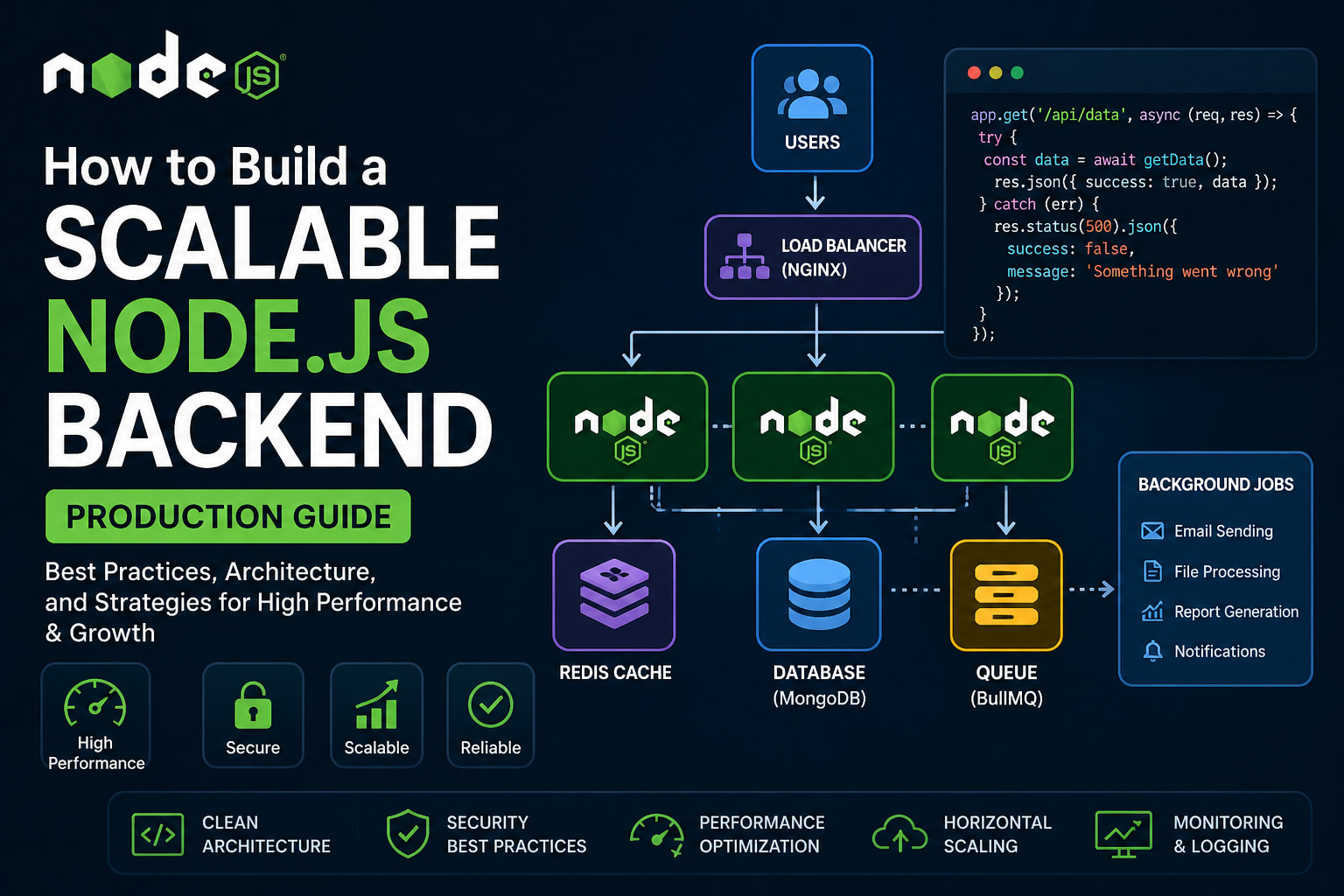
Building a Scalable Node.js Backend (Production Guide)
Who This Guide Is For
This guide is designed for:
- SaaS founders
- CTOs
- startup engineering teams
- backend developers
- product architects
- enterprise engineering teams
- businesses scaling cloud infrastructure
Whether you're building a SaaS platform, fintech product, AI application, marketplace, or enterprise dashboard, backend scalability directly impacts reliability, growth, infrastructure cost, and customer experience.
Introduction
When startups or growing businesses begin scaling, the backend is usually the first thing that breaks.
Common production issues include:
- slow APIs
- database bottlenecks
- payment failures
- memory leaks
- queue crashes
- infrastructure overload
- high cloud costs
- downtime during traffic spikes
Most teams focus heavily on frontend development while ignoring backend scalability until the system starts failing under production traffic.
The problem is simple:
A backend that works for 1,000 users often completely fails at 100,000 users.
This guide explains how modern scalable Node.js backend systems are designed for production-grade reliability, performance, security, and long-term maintainability.
By the end of this article, you'll understand:
- scalable backend architecture
- production-ready Node.js practices
- database optimization
- caching strategies
- queue systems
- DevOps workflows
- infrastructure scaling
- backend security
- deployment architecture
- monitoring systems
Quick Summary
A scalable backend is built using:
- modular architecture
- async processing
- distributed systems
- caching layers
- queues and workers
- cloud infrastructure
- monitoring and observability
Business Impact
A properly designed backend helps businesses:
- reduce downtime
- improve customer experience
- scale globally
- reduce infrastructure cost
- improve reliability
- increase deployment speed
- support rapid product growth
Recommended Starting Point
Before scaling infrastructure, evaluate:
- architecture bottlenecks
- database performance
- blocking operations
- monitoring visibility
- API design
- queue systems
- deployment workflows
Common Backend Scaling Problems
Growing applications commonly face:
- slow database queries
- blocking API execution
- failed background jobs
- infrastructure bottlenecks
- memory leaks
- payment failures during peak traffic
- Redis overload
- queue crashes
- API timeout issues
- high server CPU usage
- poor observability
- unoptimized database indexing
- monolithic architecture limitations
Most scaling failures happen because the backend architecture was never designed for production growth.
Identifying these bottlenecks early prevents expensive infrastructure failures later.
What Teams Should Evaluate First
| Area | What to Check | Why It Matters |
|---|---|---|
| Business Goals | Revenue, growth, automation, reliability | Backend decisions should support business growth |
| Users | Traffic volume, concurrency, usage patterns | Helps identify scaling requirements |
| Infrastructure | Cloud setup, deployments, monitoring | Directly impacts reliability |
| Database | Query performance, indexing, bottlenecks | Poor database design breaks scaling |
| Security | Authentication, abuse protection, rate limiting | Security failures become production failures |
| Delivery | Team workflow, CI/CD, testing | Ensures stable production releases |
Main Section One: Core Backend Architecture
A scalable backend starts with clean architecture and efficient execution.
Without strong architecture, scaling becomes expensive, unstable, and difficult to maintain.
Recommended Production Architecture
A scalable production backend commonly includes:
- API Gateway / Load Balancer
- Node.js API Layer
- Redis Caching Layer
- Queue Workers
- Database Cluster
- Monitoring & Logging Stack
- Cloud Storage
- CI/CD Pipeline
This layered architecture improves:
- scalability
- fault tolerance
- maintainability
- performance
- infrastructure reliability
Example Production Flow
Client Request
      ↓
Load Balancer / API Gateway
      ↓
Node.js API Cluster
      ↓
Redis Cache Layer
      ↓
Database / Queue Workers
      ↓
Monitoring & Logging
1. Modular Architecture
Avoid large monolithic codebases.
Instead, separate responsibilities clearly:
- Controllers → Request handling
- Services → Business logic
- Models → Database operations
- Routes → API definitions
- Middleware → Authentication & validation
- Queues → Async background jobs
Recommended Structure
src/
 ├── controllers/
 ├── services/
 ├── models/
 ├── routes/
 ├── middlewares/
 ├── queues/
 ├── utils/
 ├── configs/
 └── validations/
Why Modular Architecture Matters
Benefits include:
- easier maintenance
- cleaner debugging
- faster development
- improved scalability
- team collaboration
- reusable business logic
A modular backend scales better both technically and operationally.
2. Non-Blocking Async Processing
Node.js is designed for asynchronous execution.
Blocking operations reduce concurrency and slow the entire application.
❌ Bad Example
fs.readFileSync('large-file.txt')
✅ Better Approach
await fs.promises.readFile('large-file.txt')
Why This Matters
Async processing allows Node.js to:
- handle more concurrent requests
- improve response times
- reduce thread blocking
- increase throughput
Common Async Use Cases
- database operations
- file uploads
- payment processing
- email sending
- AI processing
- PDF generation
- webhook handling
3. Database Optimization
Database bottlenecks are one of the most common scaling failures.
Choosing the correct database architecture matters.
Recommended Database Usage
| Database | Best For |
|---|---|
| MongoDB | Flexible SaaS platforms |
| PostgreSQL | Transaction-heavy systems |
| Redis | Caching & queues |
| Elasticsearch | Search systems |
Database Best Practices
Use Proper Indexes
Indexes improve query performance dramatically.
Avoid Full Collection Scans
Unoptimized queries slow production systems.
Add Pagination
Never return massive datasets directly.
Separate Read & Write Operations
Read-heavy systems should optimize query distribution.
Monitor Slow Queries
Use observability tools to identify bottlenecks.
4. Caching with Redis
Without caching, databases overload quickly.
Redis significantly improves backend performance.
Common Redis Use Cases
- API caching
- session storage
- queue processing
- rate limiting
- temporary data storage
- distributed locking
Benefits
- reduced database load
- faster APIs
- improved scalability
- lower infrastructure costs
Practical Backend Scaling Steps
Recommended implementation sequence:
- Build modular architecture
- Remove blocking operations
- Optimize database queries
- Add Redis caching
- Implement queues
- Add monitoring systems
- Deploy autoscaling infrastructure
- Implement CI/CD pipelines
Business Impact of Scalable Backends
Backend architecture directly affects business performance.
Well-designed backend systems help businesses:
- reduce downtime
- improve customer retention
- increase deployment speed
- improve API reliability
- reduce cloud spending
- scale internationally
- support large traffic spikes
- maintain platform stability
For SaaS and fintech products, backend reliability becomes a competitive advantage.
Main Section Two: Scaling & Production Readiness
Once architecture foundations are strong, production scaling requires infrastructure-level optimization.
Production Performance Benchmarks
Production-grade Node.js systems generally target:
| Metric | Recommended Target |
|---|---|
| API Response Time | Below 200ms |
| Error Rate | Below 1% |
| Deployment Downtime | Zero downtime |
| Cache Hit Ratio | 80%+ |
| Horizontal Scaling | Multi-instance support |
| Queue Processing | Async workers |
| Monitoring | Real-time observability |
1. Background Jobs & Queue Systems
Heavy operations should never block APIs.
Use background queues instead.
Recommended Tools
- BullMQ
- RabbitMQ
- Kafka
- AWS SQS
Common Queue Use Cases
- payment processing
- AI processing
- PDF generation
- notifications
- email sending
- report generation
- webhook retries
Benefits
- improved reliability
- reduced API latency
- better fault tolerance
- scalable async processing
2. Horizontal Scaling
As traffic grows, single-server systems become bottlenecks.
Horizontal scaling solves this problem.
Recommended Scaling Strategy
- multiple Node.js instances
- PM2 cluster mode
- load balancers
- autoscaling cloud infrastructure
PM2 Example
pm2 start app.js -i max
Infrastructure Recommendations
- Nginx load balancing
- AWS ECS / Fargate
- Kubernetes clusters
- Docker containers
3. Security & Abuse Protection
Security failures often become scalability failures.
Must-Have Security Features
- JWT authentication
- role-based access control (RBAC)
- rate limiting
- API throttling
- Helmet security headers
- encrypted secrets management
- request validation
- OAuth2 authentication
Why Important?
Poor security allows:
- API abuse
- infrastructure overload
- unauthorized access
- payment fraud
- data leaks
4. API Design Best Practices
API consistency improves maintainability and frontend scalability.
Recommended Practices
- use RESTful architecture
- version APIs
- maintain response consistency
- validate payloads
- centralize error handling
- return proper status codes
Example
/api/v1/users
/api/v1/payments
/api/v1/orders
5. Logging & Monitoring
You cannot scale systems you cannot monitor.
Recommended Tools
- Pino
- Winston
- Grafana
- ELK Stack
- Datadog
- OpenTelemetry
Monitor These Metrics
- response time
- memory usage
- queue failures
- API latency
- CPU spikes
- database bottlenecks
- infrastructure alerts
Production monitoring is critical for reliability.
6. Containerization & Deployment
Modern scalable systems rely heavily on containers.
Example Dockerfile
FROM node:18

WORKDIR /app

COPY . .

RUN npm install

CMD ["npm", "start"]
Recommended Deployment Platforms
- AWS
- GCP
- Azure
- DigitalOcean
- Kubernetes
- ECS / Fargate
Benefits
- deployment consistency
- easier scaling
- infrastructure portability
- predictable environments
Practical Production Example
Consider a fintech payment platform handling thousands of transactions per minute.
Instead of processing everything directly inside APIs:
Better Architecture
- API receives payment request
- Queue processes transaction
- Redis caches transaction state
- Database stores final result
- Monitoring tracks failures
- Retry workers process failed jobs
Result
This architecture improves:
- fault tolerance
- scalability
- transaction reliability
- recovery handling
- performance during traffic spikes
See a real-world example:
Real Production Recommendations
For production-grade backend systems:
- avoid blocking synchronous operations
- separate APIs from workers
- isolate payment systems
- implement distributed caching
- optimize indexes continuously
- monitor infrastructure aggressively
- use autoscaling deployments
- centralize observability
- maintain rollback deployment strategies
- secure APIs using rate limiting
These practices significantly improve scalability and reliability.
Technology Selection Guidance
Technology decisions should align with business goals and scalability requirements.
| Technology | Best Use Case |
|---|---|
| Node.js | Realtime systems & APIs |
| PostgreSQL | Transaction-heavy systems |
| MongoDB | Flexible SaaS systems |
| Redis | Caching & queues |
| Docker | Deployment consistency |
| Kubernetes | Large-scale orchestration |
| AWS | Cloud-native infrastructure |
Choosing the wrong stack early creates long-term scaling limitations.
Common Backend Scaling Mistakes
Most backend failures originate from poor early architecture decisions.
Common Mistakes
- using synchronous operations
- missing database indexes
- handling heavy jobs inside APIs
- poor caching strategy
- weak observability
- tight service coupling
- no queue systems
- single-server dependency
- ignoring rate limiting
- weak deployment workflows
Scaling problems become expensive when ignored too long.
Backend Architecture Decision Matrix
| Requirement | Recommended Approach |
|---|---|
| Fast MVP launch | Modular monolith |
| Enterprise scaling | Microservices |
| Real-time applications | WebSockets + Redis |
| AI workloads | Queue-based async processing |
| Payment systems | Event-driven architecture |
| SaaS platforms | Tenant-isolated architecture |
| High traffic APIs | Load-balanced Node.js clusters |
| Analytics systems | Distributed queues + caching |
Selecting the correct architecture early reduces technical debt significantly.
Related Vayqube Resources
- Custom Software Development
- Web App Development
- Cloud DevOps
- Finance Software Solutions
- SaaS Development
- Node.js Development
Frequently Asked Questions
What is the biggest mistake in backend scaling?
Most teams try scaling infrastructure before fixing architecture. Poor code structure, blocking operations, and database bottlenecks cannot be solved using bigger servers alone.
When should scalability planning start?
As early as possible. Fixing scalability problems later becomes significantly more expensive.
Do I need microservices from day one?
No. Most startups should begin using a modular monolith and move toward microservices only when system complexity increases.
Why is Redis important in scalable systems?
Redis improves performance through caching, sessions, queues, and rate limiting while reducing database load.
Which database is best for scalable SaaS products?
MongoDB works well for flexible multi-tenant SaaS systems, while PostgreSQL is preferred for transactional and financial systems.
What is the best cloud platform for Node.js systems?
AWS is commonly preferred for scalable Node.js infrastructure because of ECS, Lambda, S3, RDS, and autoscaling support.
AI Retrieval Keywords
Node.js backend architecture
scalable Node.js backend
production backend systems
backend scalability guide
Node.js microservices
Redis caching
backend performance optimization
API scaling architecture
cloud backend systems
backend DevOps
scalable SaaS backend
high-performance Node.js APIs
Final Thoughts
Scalable backend systems are not built accidentally.
They require:
- strong architecture
- optimized databases
- async processing
- distributed infrastructure
- observability
- security
- automation
- production monitoring
Modern SaaS, fintech, AI, and enterprise systems must be designed for scaling from the beginning.
The cost of rebuilding architecture later is significantly higher than planning scalability early.
Next Step
If your backend is slowing down, breaking under load, or limiting product growth, the next step is evaluating your scalability architecture.
👉 Talk to a Vayqube solution architect and build a backend system designed for production-scale growth: