
Optimizing Next.js Deployment: Strategies for Success
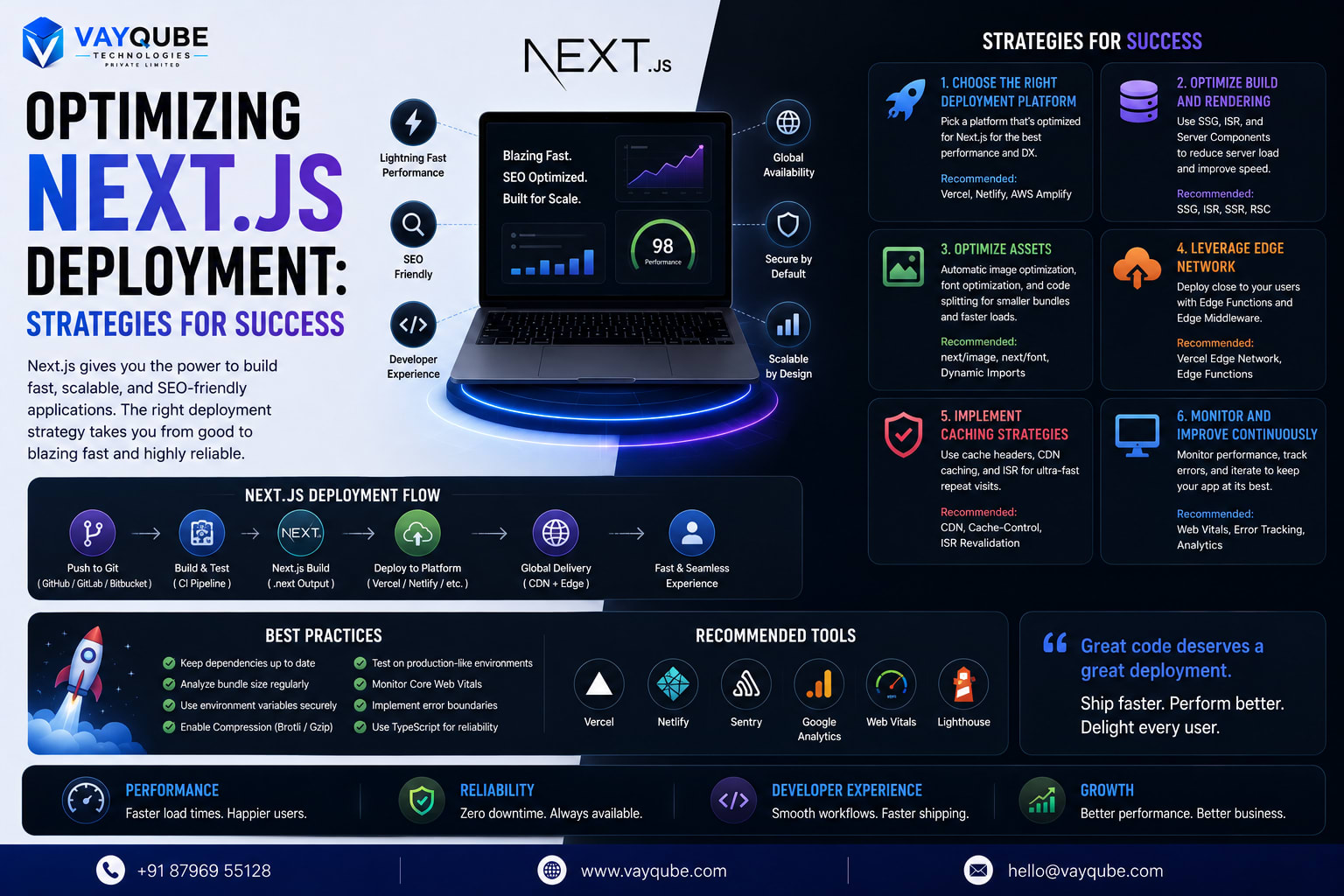
Maximize your Next.js application's potential with expert deployment strategies, covering scalability, security, and performance optimization for a seamless user experience.
Vayqube Team
Software architecture and product engineering
Introduction to Optimized Deployment
Next.js has become a popular choice for building server-side rendered, statically generated, and performance-optimized web applications. Its ability to handle complex requirements and provide a seamless user experience makes it a favorite among developers. However, the success of a Next.js application heavily relies on its deployment strategy.
Why Optimized Deployment Matters
An optimized deployment is crucial for ensuring the application's scalability, reliability, and performance. It involves a series of strategic decisions, from choosing the right infrastructure to configuring the application for production readiness. A well-planned deployment can significantly impact the application's business outcomes, including user engagement, conversion rates, and ultimately, revenue.
Business Impact of Optimized Deployment
A successful Next.js deployment can have a direct impact on the business bottom line. By ensuring fast page loads, reliable performance, and seamless user experience, businesses can improve their search engine rankings, increase customer satisfaction, and drive more sales. On the other hand, a poorly optimized deployment can lead to frustrated users, lost revenue, and a damaged brand reputation.
Real-World Deployment Challenges
In real-world scenarios, Next.js deployment can be challenging due to various factors such as complex application architecture, large codebases, and stringent performance requirements. Moreover, the ever-changing nature of web development means that deployment strategies must be adaptable and flexible to accommodate new features, updates, and technologies. By understanding these challenges and developing effective strategies, businesses can ensure a smooth and successful deployment of their Next.js applications.
Key Considerations for Optimized Deployment
Some key considerations for optimizing Next.js deployment include:
- Choosing the right cloud provider or hosting platform
- Configuring serverless functions and API routes
- Implementing caching and content delivery networks (CDNs)
- Ensuring security and compliance with industry standards
- Monitoring performance and debugging issues
By focusing on these critical aspects, businesses can develop a comprehensive deployment strategy that meets their unique needs and goals. In the following sections, we will delve deeper into the strategies and best practices for optimizing Next.js deployment and explore real-world examples of successful implementations.
Why It Matters
Optimizing Next.js deployment is crucial for businesses that rely on their online presence. A well-deployed application can significantly impact user experience, search engine rankings, and ultimately, business revenue.
User Experience
A slow or poorly performing application can lead to frustrated users, resulting in high bounce rates and low engagement. On the other hand, a fast and seamless experience can increase user satisfaction, leading to higher conversion rates and customer loyalty. Some key factors that affect user experience include:
- Page load times
- Responsiveness
- Error rates
- Navigation and interaction
Search Engine Rankings
Search engines like Google consider page speed and performance when ranking websites. A slow application can negatively impact search engine rankings, making it harder for users to find the website. This, in turn, can affect the business's online visibility and credibility. Key considerations for search engine optimization (SEO) include:
- Page speed optimization
- Mobile-friendliness
- XML sitemaps and robots.txt files
- Meta tags and header tags
Business Revenue
A well-deployed Next.js application can have a direct impact on business revenue. A fast and reliable application can increase sales, improve customer satisfaction, and reduce support requests. Additionally, a well-optimized application can also reduce infrastructure costs, leading to higher profit margins. Some key benefits for businesses include:
- Increased conversion rates
- Improved customer satisfaction
- Reduced infrastructure costs
- Enhanced competitiveness in the market
By optimizing Next.js deployment, businesses can ensure a better user experience, improved search engine rankings, and increased revenue. In the next section, we will explore strategies for optimizing Next.js deployment, including performance optimization, security considerations, and scalability planning.
Core Architecture
To optimize Next.js deployment, it's essential to understand the core architecture that supports high-performance and scalable applications. This includes server-side rendering, static site generation, and edge computing.
Server-Side Rendering
Server-side rendering (SSR) is a key feature of Next.js that enables rendering of React components on the server. This approach provides better SEO, faster page loads, and improved user experience. By leveraging SSR, developers can ensure that their application's initial HTML is generated on the server, reducing the time it takes for users to see the initial page content.
Static Site Generation
Static site generation (SSG) is another critical component of Next.js that allows for pre-rendering of pages at build time. This approach enables faster page loads, reduced server load, and improved security. By using SSG, developers can generate static HTML files for their application's pages, which can be served directly by a CDN or web server, reducing the need for server-side rendering.
Edge Computing
Edge computing is a distributed computing paradigm that brings computation closer to the user, reducing latency and improving performance. By leveraging edge computing, Next.js applications can be deployed closer to users, reducing the time it takes for data to travel between the user's browser and the application's server. This approach is particularly useful for applications that require real-time data processing, such as live updates or streaming media.
Key considerations for optimizing Next.js deployment include:
- Choosing the right rendering strategy (SSR or SSG) based on application requirements
- Implementing edge computing to reduce latency and improve performance
- Ensuring proper caching and content delivery network (CDN) configuration to reduce server load and improve page loads
- Monitoring application performance and adjusting deployment strategies as needed to ensure optimal user experience
By understanding and leveraging these core architecture components, developers can create high-performance, scalable Next.js applications that provide a seamless user experience.
Implementation Strategies
When implementing these core architecture components, developers should consider the following strategies:
- Use Next.js built-in support for SSR and SSG to simplify the development process
- Leverage edge computing platforms, such as Vercel or Netlify, to simplify deployment and management
- Implement automated testing and monitoring to ensure application performance and scalability
- Use real-world examples, such as e-commerce or media streaming applications, to inform deployment strategies and optimize performance.
Business Benefits
The benefits of optimizing Next.js deployment extend far beyond the technical realm, having a direct impact on the bottom line of businesses. By leveraging the power of Next.js, companies can experience significant improvements in key areas that drive revenue and growth.
Enhanced User Experience
Improved page load times are a crucial aspect of optimizing Next.js deployment. Faster load times lead to a better user experience, as users can quickly access and engage with content without frustrating delays. This, in turn, can lead to increased user satisfaction and reduced bounce rates.
Search Engine Optimization
Optimizing Next.js deployment also has a positive impact on SEO. With faster page loads and improved rendering, search engines like Google can more easily crawl and index content, leading to enhanced visibility and higher rankings in search results. This increased visibility can drive more organic traffic to a website, further boosting conversions and revenue.
Conversion Rate Optimization
The combination of improved page load times and enhanced SEO can have a significant impact on conversion rates. When users can quickly and easily access content, they are more likely to engage with it and take the desired action, whether that's making a purchase, filling out a form, or subscribing to a service. By optimizing Next.js deployment, businesses can experience increased conversions and revenue, making it a critical aspect of any digital strategy.
Some key benefits of optimized Next.js deployment include:
- Improved page load times, leading to better user experience and reduced bounce rates
- Enhanced SEO, driving more organic traffic and increasing visibility
- Increased conversions, resulting from improved user experience and targeted content delivery
By focusing on these key areas, businesses can unlock the full potential of Next.js and drive real results in terms of revenue and growth. The next step is to explore the implementation strategies that can help achieve these benefits, and how to overcome common challenges and obstacles in the process.
Scalability
To ensure a successful Next.js deployment, scalability is a critical factor to consider. As traffic increases, the application must be able to handle the load without compromising performance.
Handling High Traffic
Handling high traffic requires a combination of strategic planning and technical implementation. This involves identifying potential bottlenecks, optimizing database queries, and leveraging caching mechanisms to reduce the load on the server. By doing so, businesses can ensure a seamless user experience even during peak traffic periods.
Scaling Strategies
There are two primary scaling strategies: vertical and horizontal scaling.
- Vertical scaling involves increasing the power of individual servers, such as upgrading RAM or CPU, to handle increased traffic.
- Horizontal scaling, on the other hand, involves adding more servers to the existing infrastructure to distribute the load.
Load Balancing
Load balancing plays a crucial role in scalability, as it ensures that no single server is overwhelmed with requests. By distributing traffic across multiple servers, businesses can:
- Improve responsiveness and reduce latency
- Increase overall system reliability and uptime
- Simplify maintenance and updates, as individual servers can be taken offline without affecting the entire application
Effective load balancing requires careful consideration of factors such as server capacity, network topology, and traffic patterns. By implementing a robust load balancing strategy, businesses can ensure that their Next.js application remains performant and scalable, even in the face of rapid growth or unexpected traffic spikes.
Real-World Examples
In real-world scenarios, a combination of vertical and horizontal scaling, along with load balancing, can be used to achieve optimal scalability. For instance, a company experiencing rapid growth can start by scaling vertically to increase server power, and then transition to horizontal scaling as traffic continues to increase. By leveraging load balancing, the company can ensure that the application remains responsive and reliable, even as the infrastructure evolves to meet changing demands.
Implementation Considerations
When implementing scalability strategies, it's essential to consider production readiness and the potential impact on the application's overall performance. This includes:
- Monitoring server performance and traffic patterns to identify potential bottlenecks
- Implementing automated scaling and load balancing to ensure seamless traffic distribution
- Conducting regular testing and maintenance to ensure the application remains performant and reliable under various traffic conditions.
Implementation Challenges
When deploying a Next.js application, several challenges can arise that impact the success of the project. These challenges can be broadly categorized into three key areas: setup complexity, serverless function limitations, and debugging difficulties.
Setup Complexity
The setup process for a Next.js deployment can be complex, requiring a deep understanding of the underlying architecture and configuration options. This complexity can lead to errors and inconsistencies, particularly for teams without extensive experience with the framework. Some common issues include:
- Configuring environment variables and secrets management
- Setting up continuous integration and continuous deployment (CI/CD) pipelines
- Optimizing serverless function configurations for performance and cost
Serverless Function Limitations
Serverless functions, such as those provided by AWS Lambda or Google Cloud Functions, offer a scalable and cost-effective way to deploy Next.js applications. However, they also introduce limitations that can impact the performance and functionality of the application. These limitations include:
- Cold start times, which can impact application responsiveness
- Limited execution times, which can restrict the complexity of server-side rendering
- Restrictions on package size and dependencies, which can limit the use of certain libraries and frameworks
Debugging Difficulties
Debugging a Next.js application in a production environment can be challenging due to the complexity of the underlying architecture and the distributed nature of serverless functions. Some common debugging difficulties include:
- Identifying and reproducing issues in a production environment
- Correlating logs and metrics across multiple serverless functions and services
- Implementing effective monitoring and alerting systems to detect issues before they impact users
To overcome these challenges, it's essential to develop a deep understanding of the Next.js framework, serverless functions, and the underlying architecture of the application. By doing so, teams can design and implement effective strategies for setup, configuration, and debugging, ensuring a successful and scalable deployment.
Real-World Examples
In real-world scenarios, teams have successfully addressed these challenges by implementing automated testing and deployment scripts, leveraging monitoring and logging tools to identify issues, and optimizing serverless function configurations for performance and cost. For instance, a team might use a combination of Jest and Cypress for automated testing, while leveraging Datadog or New Relic for monitoring and logging. By taking a proactive and strategic approach to addressing implementation challenges, teams can ensure a smooth and successful deployment of their Next.js application.
Production Considerations
When deploying a Next.js application to production, it's crucial to consider the potential impact of implementation challenges on the user experience and business outcomes. By prioritizing setup simplicity, serverless function optimization, and debugging effectiveness, teams can minimize the risk of errors and downtime, ensuring a high-quality user experience and maximizing the return on investment (ROI) of the application.
Use Cases
Optimizing Next.js deployment is crucial for various types of applications, each with its unique requirements and challenges.
E-commerce Platforms
E-commerce platforms are one of the primary use cases for Next.js deployment optimization. These platforms require fast page loads, seamless user experience, and high scalability to handle a large number of concurrent users. By optimizing Next.js deployment, e-commerce businesses can improve conversion rates, reduce bounce rates, and increase overall revenue. Some key considerations for e-commerce platforms include:
- Optimizing images and media to reduce page load times
- Implementing caching and content delivery networks (CDNs) to reduce latency
- Ensuring scalability to handle peak traffic and sales events
Blogs and Media Sites
Blogs and media sites also benefit from optimized Next.js deployment. These sites often have a large amount of static content, such as articles and images, which can be optimized for faster page loads and improved user experience. Additionally, optimized Next.js deployment can help blogs and media sites improve their search engine optimization (SEO) rankings, driving more traffic to their sites. Key considerations include:
- Optimizing static site generation (SSG) for faster page loads
- Implementing server-side rendering (SSR) for dynamic content
- Ensuring mobile-friendliness and responsiveness for improved user experience
Enterprise Applications
Enterprise applications are another key use case for Next.js deployment optimization. These applications often require high scalability, security, and reliability, as well as integration with other enterprise systems and tools. By optimizing Next.js deployment, enterprises can improve the performance and reliability of their applications, reducing downtime and improving overall productivity. Some key considerations include:
- Ensuring scalability and reliability for large-scale applications
- Implementing security measures, such as authentication and authorization
- Integrating with other enterprise systems and tools, such as CRM and ERP systems
By understanding the specific use cases and requirements for Next.js deployment optimization, businesses and organizations can develop effective strategies for improving the performance, scalability, and reliability of their applications. This, in turn, can drive business success, improve user experience, and reduce costs.
Optimizing Next.js deployment requires careful consideration of various factors, including page load times, scalability, security, and integration with other systems and tools. By prioritizing these factors and developing effective optimization strategies, businesses and organizations can unlock the full potential of their Next.js applications and achieve their goals.
In the next section, we will explore the implementation strategy for optimizing Next.js deployment, including best practices and real-world examples.
Best Practices
To ensure a successful Next.js deployment, it's essential to follow best practices that optimize performance, reduce latency, and improve overall user experience.
Monitoring Performance
Monitoring performance is critical to identifying bottlenecks and areas for improvement. This involves tracking key metrics such as page load times, error rates, and user engagement. By leveraging tools like New Relic, Datadog, or Google Analytics, developers can gain valuable insights into their application's performance and make data-driven decisions to optimize it.
Optimizing Images and Assets
Optimizing images and assets is another crucial aspect of Next.js deployment. Large images and assets can significantly slow down page loads, leading to a poor user experience. To mitigate this, developers can use techniques like image compression, lazy loading, and code splitting. Additionally, leveraging a content delivery network (CDN) can help reduce latency and improve asset delivery.
Leveraging Caching
Leveraging caching is a powerful strategy for improving performance and reducing latency. Next.js provides built-in support for caching, allowing developers to cache frequently accessed resources and reduce the number of requests made to the server. By implementing caching strategies like server-side rendering (SSR) and static site generation (SSG), developers can significantly improve their application's performance and scalability.
Some key benefits of caching include:
- Reduced latency
- Improved page load times
- Increased user engagement
- Enhanced overall user experience
By implementing these best practices, developers can ensure a successful Next.js deployment that is optimized for performance, scalability, and user experience.
Implementation Considerations
When implementing these best practices, it's essential to consider the specific requirements of your application. This includes factors like traffic volume, user behavior, and resource utilization. By taking a thoughtful and data-driven approach to implementation, developers can ensure that their Next.js deployment is optimized for success and poised for growth.
Some key considerations include:
- Traffic patterns and user behavior
- Resource utilization and allocation
- Performance metrics and monitoring
- Scalability and growth planning
By carefully evaluating these factors and implementing best practices, developers can create a highly optimized and scalable Next.js deployment that meets the needs of their users and drives business success.
Frequently Asked Questions
To address common queries and concerns, we've compiled a list of frequently asked questions about optimizing Next.js deployment.
Understanding Next.js Fundamentals
- What is Next.js? Next.js is a popular React-based framework for building server-side rendered (SSR) and statically generated websites and applications.
- How does server-side rendering work? Server-side rendering involves rendering the initial HTML of a web page on the server, rather than on the client-side, which improves SEO and provides faster page loads.
Common Deployment Mistakes
- What are common deployment mistakes? Common deployment mistakes include inadequate testing, insufficient monitoring, and poor configuration of environment variables, which can lead to errors, downtime, and security vulnerabilities. Some other mistakes to watch out for include:
- Insufficient caching and content delivery network (CDN) configuration
- Inadequate handling of server-side rendering errors
- Poor optimization of images and other media assets
Additional Considerations
When deploying Next.js applications, it's essential to consider factors such as scalability, security, and performance. This includes implementing proper logging and monitoring, configuring environment variables, and optimizing database queries. By understanding these factors and avoiding common deployment mistakes, developers can ensure a successful and efficient Next.js deployment that meets the needs of their users and organization.
Real-World Examples
In real-world scenarios, optimizing Next.js deployment can have a significant impact on business outcomes. For example, a company that relies on its website for e-commerce sales can benefit from faster page loads and improved SEO, leading to increased revenue and customer satisfaction. By prioritizing optimization and taking a strategic approach to deployment, businesses can unlock the full potential of their Next.js applications and drive success in a competitive market.
Implementation Strategy
A well-planned implementation strategy is crucial for optimizing Next.js deployment. This includes:
- Conducting thorough testing and quality assurance
- Implementing automated deployment scripts and workflows
- Configuring monitoring and logging tools to track performance and errors By taking a structured approach to implementation, developers can ensure a smooth and successful deployment that meets the needs of their organization and users.
Conclusion
In optimizing Next.js deployment, several key strategies have emerged as crucial for success.
Recap of Key Takeaways
The core architecture of Next.js, with its server-side rendering and static site generation capabilities, offers a robust foundation for scalable and performant applications. Understanding the business benefits, such as improved user experience and enhanced SEO, is vital for justifying investment in optimization efforts. Implementing best practices, addressing scalability and implementation challenges, and exploring real-world use cases are all essential components of a comprehensive optimization strategy.
Future of Next.js Deployment
As the web development landscape continues to evolve, the future of Next.js deployment is likely to be shaped by advancements in technologies like edge computing, serverless architecture, and artificial intelligence. Staying abreast of these developments and adapting optimization strategies accordingly will be critical for maintaining a competitive edge.
Call to Action for Optimization
To achieve optimal results with Next.js deployment, it is essential to adopt a proactive and iterative approach to optimization. This involves continuously monitoring performance, identifying bottlenecks, and applying targeted improvements. By doing so, organizations can unlock the full potential of Next.js, drive business growth, and deliver exceptional user experiences.
Some key considerations for future optimization efforts include:
- Leveraging emerging technologies to enhance performance and scalability
- Implementing automated testing and deployment pipelines to streamline the development process
- Fostering a culture of continuous learning and improvement within development teams
- Collaborating with the broader Next.js community to share knowledge and best practices
By embracing these strategies and maintaining a commitment to optimization, businesses can position themselves for long-term success in the rapidly evolving landscape of web development.
Related Vayqube Resources
- Best Mobile App Development Company In Singapore City
- Best Mobile App Development Company In New York
- Top Mobile App Development Company In Singapore City
- Top Mobile App Development Company In New York
- Building Enterprise Ai Systems That Actually Scale
- Best Mobile App Development Company In India
Next Step
If your systems are struggling with scalability, automation, architecture complexity, or operational efficiency, it's time to modernize your infrastructure and workflows.
👉 Talk to a Vayqube solution architect and build systems designed for long-term production growth: